Hard shutdown and Pull requests

Hi everyone!
I’ve been following this community for a long time, but I believe this is my first time posting here.

I recently watched a video from Phil where your motor unexpectedly shut down (by overheating). That caught my attention.

I’m currently developing my own flight controller and have implemented a simple algorithm that reduces power in certain situations — like when there’s overheating or low voltage.

So, I’d like to ask: is it possible to contribute to your flight controller project? If so, how can I get involved?

Thanks in advance!

1 Like

Well done! This is overdue, especially with regard to low cell voltages. I’d rather lose power gracefully than fully (and unexpectedly).

An option that I think most would support is to use haptic feedback instead of limiting power for events other than low voltages. A vibration buzz would be a good warning for the pilot to reduce power. There is a school of thought that the pilot should be allowed to do anything, even if dangerous/damaging. You might want to cook your ESC to get you over an obstacle to safety …

For low voltages, limiting power makes the most sense. If a pilot were to push past the controller limit, the BMS would simply cut them off anyway.

Andrew

This isn’t quite true. Phil has an old unit with the new battery, which means he can’t see the point at which the BMS will shut off his system to protect the battery cells. It shut off because of low voltage, not because of overheating, and with the new V2.5 system all of this information and its warnings are displayed on the screen so you know exactly when a power-down will occur. The V2.5 system also has built-in throttle-down in the event of overheating, automatically regulating power.

The features you’re looking for are already implemented, but units that are a few years old don’t have all the information and control that the new ones do.

3 Likes

Perfect! Good to know it.

Paul, this is info those of us using V2.5 should know about, when will the new documentation be available? What else can I expect the system to do, will it shutdown at a certain level? I note that if I let it charge to 100%, the pack settles at a lower level after 10 minutes and the charger kicks back on, is this normal? Yesterday’s flight I attempted to exceed my 30 minute mark for the half size pack and launched at 100%, after 10 seconds into the flight, my power was already down to 92% but I flew very low and conservative, but 30 minutes later at 10% I landed only to see the pack recover to 17%, should I try to take it to 0%?

More documentation is currently being developed. I want to include the latest upcoming firmware features, so I’m not having to rewrite the manual it once they’re released. The new firmware will display system states as plain text, allowing warnings, critical states, or errors to show up clearly for easier diagnosis. Again, we aim to keep things simple and avoid overwhelming the user with information they don’t understand.

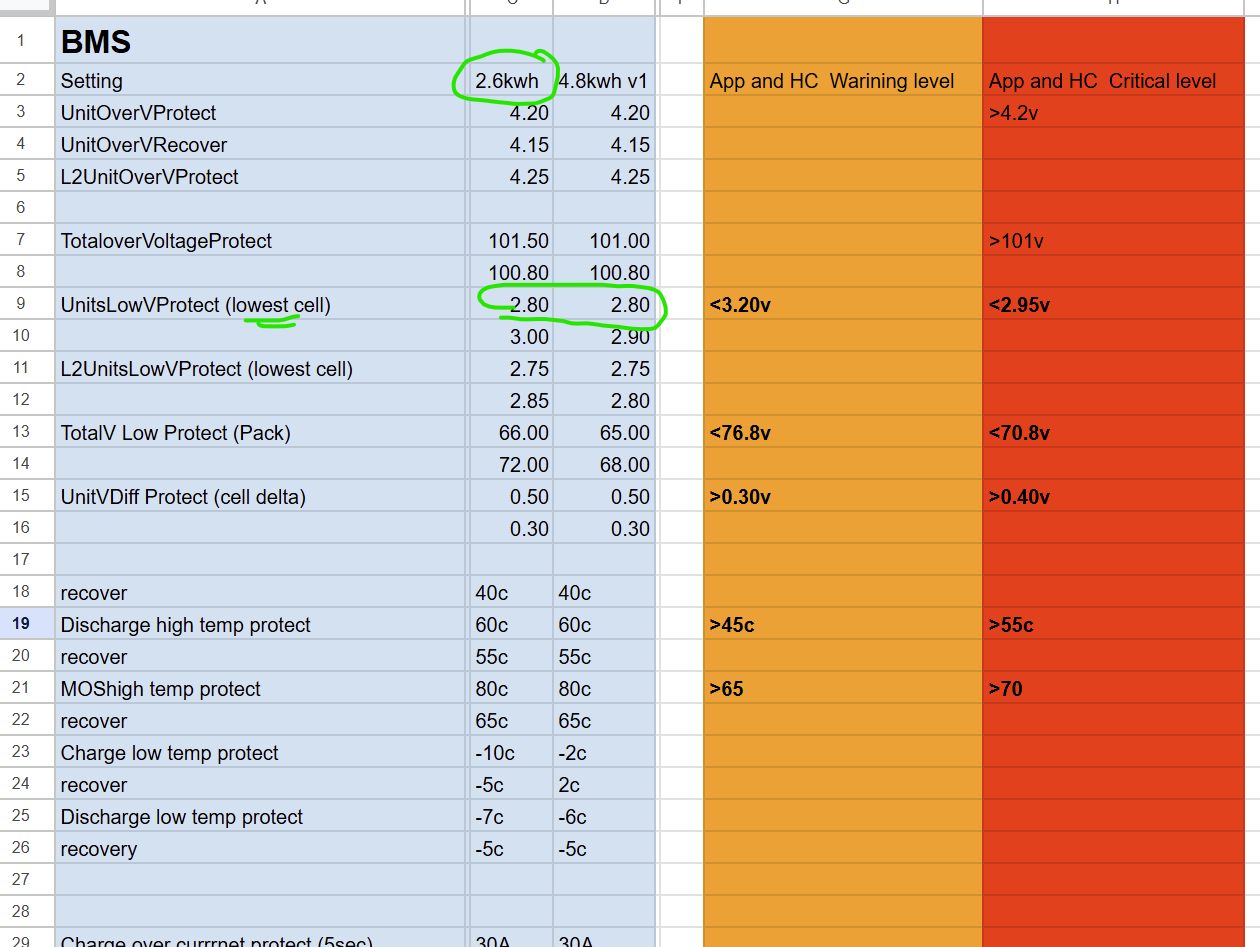
For now, if you want to test the full capacity of your battery pack and push it to its limits without exceeding safety parameters, you can monitor the lowest cell voltage displayed in the top-left corner of your hand controller’s screen. Ensure the voltage does not drop below 2.8V, as the BMS will then shut off the output to prevent excessive cell damage. At that point, the SOC percentage will read zero for quite some time, indicating you’ve gone beyond what is normally recommended. With the new system, you can keep flying past zero percent, as an extra buffer is built in.

Regarding the SOC calculation, we use a hybrid approach involving measuring the current entering and leaving the battery over time (Coulomb counting). This method continuously tracks current to estimate the remaining battery capacity. However, Coulomb counting alone may accumulate errors due to sensor inaccuracies or battery self-discharge. To mitigate these inaccuracies, the battery’s measured voltage is periodically compared against known reference voltages corresponding to specific SOC values. These voltage references periodically recalibrate the Coulomb counting calculation. Occasionally, adjustments will be made based on voltage lookup tables. These tables can be adjusted or disabled, as they’re susceptible to voltage sag, but using them is currently the most accurate way to achieve consistent and reliable SOC calculations.

Here, you can also see some of the temperature and voltage thresholds in the BMS. These will appear on the controller screen when certain values are reached, making sure the pilot has plenty of advance warning about anything that could affect flight performance. We prefer to remain conservative with these limits, but we can push them further if desired. We have people flying over water or other locations, where encountering issues could be not fun, so we are extra conservative by default.

All technical details like these would be excessive for the user manual. As most people don’t know what this information means, and they shouldn’t have to learn it. The manual should be simplified and should not contain extensive technical information. Maybe we will make a technical manual for the technical people but it does take a lot of effort to document everything is decent detail there is just so much stuff it would be hundreds of pages if not more. So for now, we will just have a simple manual coming.
4 Likes

Great, useful information, thanks for the explanation! I agree that too much technical data can overwhelm some, but knowing the levels of warning, alarm, and shutdown are critical when flying, now I understand. It would also be good to know how the system reacts if say battery temp rises and power is being limited and to what degree, all things the pilot should know and be cognizant of, these should be in the manual.

I tested it today starting from a cold resting level of 15% by running the paramotor at typical cruise load of 4kw and after about 5 minutes or so, hand throttle display had dropped to 3% and turned red, lowest cell voltage was 2.89 and slowly dropping when the BMS suddenly cutoff at about 2.86V so I did not see the display drop below 3%. Running V7.1

Sounds right, once 2.8V is hit, it will shut off the output. And once you’re below 3V, variations in load (voltage sag) can quickly trip that low cell, even if you don’t see it right away on the screen, since the BMS info is sent to the hand controller every 500ms.

If you really want to see the reason for the shutdown, just look at the BMS app it shows all the info there. Have you looked at that at all?

Also, you could even change this low voltage cutoff level in the app if you wanted to, but I wouldn’t change it there’s no need.

I should have been monitoring the BMS app to see exactly what it was seeing at shutdown, but I only checked it after shutdown and it was reporting low voltage. I was more focused on what the display was reporting since that is what I’ll be watching while flying.

Very happy to see this!

This topic was automatically closed after 4 days. New replies are no longer allowed.